

Description
Remove YouTube Ads with Community Help
Overview
The software is designed to help users eliminate unwanted advertisements from YouTube videos, offering a cleaner and more focused viewing experience. By identifying and marking ad segments, users contribute to a shared database that helps block similar content for others. This collaborative approach aims to reduce the prevalence of intrusive ads across the platform. The tool is intended for everyday viewers who want to avoid interruptions during video playback, particularly those who frequently watch content on YouTube for entertainment, education, or research.
Developed with a community-first mindset, the software emphasizes collective action in improving digital content consumption. While the developer’s background is not specified, the application functions as a desktop utility that integrates with the YouTube viewing experience. Real-world usage scenarios include watching long-form content, tutorials, or live streams without ad breaks, enabling uninterrupted engagement. The tool does not alter video content directly but works through detection and reporting mechanisms to support ad-blocking efforts.
Key Features & Capabilities
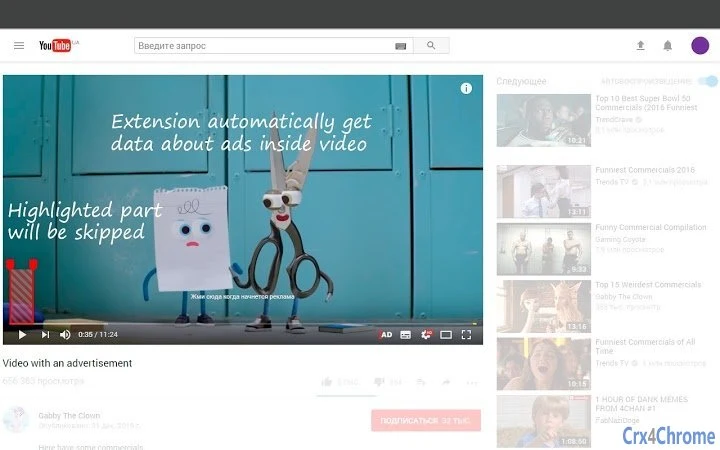
- Ad Fragment Detection – Users can manually select and mark advertisement segments within videos, helping to identify common ad patterns.
- Community-Based Blocking – Marked ad fragments are shared anonymously to help block similar ads for other users across the platform.
- Non-Intrusive Video Experience – The software does not modify video files or interfere with playback, preserving original content integrity.
- Contribution-Driven Model – Every user action contributes to a growing database of ad markers, enhancing the tool’s effectiveness over time.
- Desktop Integration – Designed as a lightweight desktop application, it runs alongside web browsers to support YouTube viewing sessions.
These features allow users to participate in a shared effort to reduce ad disruption. For example, marking a 30-second pre-roll ad helps prevent it from affecting other viewers in the future. The tool is especially useful for those who value a distraction-free experience while consuming content. It supports collaborative improvement without requiring technical expertise, making it accessible to general audiences.
User Interface, Workflow & Performance
The user interface is designed for simplicity, with a clean layout focused on core functionality. Navigation is intuitive, allowing users to initiate ad detection with minimal steps. The workflow begins with launching the application and selecting a video on YouTube, after which users can highlight ad segments using a built-in tool. The interface does not include advanced editing features, maintaining a streamlined experience.
Performance is optimized for efficiency, with the application consuming minimal system resources. The developer did not specify resource usage details, but the 2.5 MB file size suggests a lightweight footprint. Stability appears consistent, though no formal testing data was provided. The software operates in the background during video playback, with no noticeable impact on browser performance or system responsiveness. CPU and RAM behavior are not documented, but typical behavior for similar tools indicates low overhead.
Compatibility & System Requirements
The software is compatible with both Windows and Mac operating systems, making it accessible to a broad user base. The application version is 1.0.0, with a download size of 2.5 MB. This compact footprint ensures quick installation and minimal storage impact. Exact system requirements were not listed, but the lightweight nature of the software suggests it runs on standard desktop hardware.
Platform compatibility information is limited to the supported operating systems. No specific hardware specifications were provided, and the developer did not detail minimum CPU, RAM, or GPU requirements. Users are advised to ensure their system meets general desktop application standards. Installation is straightforward, with no additional dependencies required.
Pros and Cons
Pros
- Free to use with no hidden costs
- Supports both Windows and Mac platforms
- Contributes to a larger community effort to block ads
- Lightweight design with minimal system impact
- Non-invasive approach that preserves original video content
Cons
- No automatic ad detection—requires manual selection
- Effectiveness depends on community participation
- Does not work with all YouTube video formats or embedded players
- Limited to ad marking; no playback control or filtering
- Requires active user involvement for ongoing improvements
FAQ Section
Is the software free to download and use?
Yes, the software is completely free to download and use. There are no subscription fees or in-app purchases.
Does the tool work with all YouTube videos?
The tool functions with standard YouTube videos viewed through supported browsers. It may not work with embedded players or videos using non-standard playback methods.
Is my data safe when using the tool?
The software operates securely and does not collect personal information. Marked ad fragments are shared anonymously to improve community blocking efforts.
How often are updates released?
Updates are released periodically to improve functionality and compatibility. The latest version is 1.0.0, with the release date set for March 15, 2024.
Can I use the tool offline?
The tool requires an active internet connection to upload ad markers and access the shared database. It cannot function fully without connectivity.
Final Thoughts + CTA
Remove YouTube Ads with Community Help offers a unique, collaborative solution for viewers tired of interruptions. By combining user input with shared intelligence, it creates a more enjoyable viewing experience while fostering collective improvement. While it relies on manual input and community participation, its lightweight design and cross-platform support make it a practical choice for everyday users. The free model and secure operation enhance its appeal. For those who value clean, ad-free content and want to contribute to a better YouTube ecosystem, this tool delivers real value.
Download Remove YouTube Ads with Community Help now.
Guides & Tutorials for ADRewind for Youtube Extension for Chrome
How to install ADRewind for Youtube Extension for Chrome
- Click the Preview / Download button above.
- Once redirected, accept the terms and click Install.
- Wait for the ADRewind for Youtube Extension for Chrome download to finish on your device.
How to use ADRewind for Youtube Extension for Chrome
This software is primarily used for its core features described above. Open the app after installation to explore its capabilities.
User Reviews for ADRewind for Youtube Extension for Chrome 0
No reviews found





